
In January 2026 we introduced our initial Proxmox VE support through a direct storage integration plugin, enabling customers to use QuantaStor iSCSI storage volumes as VM data storage within Proxmox. In the months since, we’ve been steadily expanding the plugin’s capabilities. With QuantaStor 6.9, the Proxmox plugin adds support for Proxmox containers (LXC) and live migration of VMs between Proxmox cluster nodes.
The plugin is open source under the MIT license and developed in the open on GitHub at https://github.com/OSNEXUS/pve-quantastor-plugin, with installation and discussion also available in our thread on the Proxmox community forum: https://forum.proxmox.com/threads/quantastor-proxmox-storage-plugin.179232/
A Quick Recap: How the Plugin Works
The QuantaStor plugin registers as a first-class storage type within Proxmox VE, installed as a Debian package on each cluster node. Rather than carving VM disks out of a shared LUN, the plugin provisions each virtual disk as a dedicated QuantaStor storage volume and presents it to the Proxmox host over iSCSI, using stable /dev/disk/by-path device paths that persist across reboots. This one-volume-per-disk model means every VM disk gets its own snapshot capability, its own performance and capacity accounting, and its own access controls on the QuantaStor side.
All communication with the appliance goes through QuantaStor’s REST API over HTTPS. Adding QuantaStor storage to a Proxmox datacenter takes just a few fields: the QuantaStor API host, credentials, and the storage pool to provision from. A pool scan button in the Add Storage dialog connects to the appliance and populates a dropdown of available pools, and the iSCSI portal can be pointed at a separate data network for environments that separate management and data traffic. API credentials follow the same secure handling convention Proxmox uses for its own CIFS and PBS storage types: the password is stored in a root-only file under /etc/pve/priv and replicated across the cluster by pmxcfs, never written to storage.cfg in plaintext.


New in 6.9: Proxmox Container Support
The initial plugin release supported the Disk image content type for VM storage. The plugin now also supports the Container content type, so LXC container root filesystems can be provisioned on QuantaStor the same way VM disks are. Each container receives its own dedicated thin-provisioned storage volume over iSCSI, following the same one-volume-per-workload model as VM disks. Where QEMU consumes VM disks directly as block devices, container volumes are formatted with a filesystem and mounted for the container by the plugin.
Container volumes benefit from the same underlying capabilities as VM volumes: thin provisioning from the storage pool, snapshots, and template-based cloning. When a container or VM is converted to a template, the plugin renames the backing volume to the base image naming convention and captures a template snapshot on the QuantaStor side. Clones are then created from that snapshot, so new containers and VMs deploy quickly and share unmodified blocks with the template rather than duplicating them.
New in 6.9: Live Migration Across Cluster Nodes
Because every QuantaStor volume is accessible over iSCSI from any node in the Proxmox cluster, the plugin registers QuantaStor as shared storage, which unlocks live migration of running VMs between nodes without moving any disk data.
During a live migration, the plugin grants the destination node access to each of the VM’s storage volumes and logs it into the corresponding iSCSI targets, Proxmox transfers the running VM’s memory and device state, and the source node’s sessions and access grants are released once the cutover completes. Since the virtual disks never move, migration time is governed by the VM’s memory footprint and rate of change rather than its disk capacity. A VM with terabytes of attached storage migrates just as quickly as one with a small boot disk.
Container migration between nodes is supported as well, using the same shared storage mechanics with a brief restart of the container on the destination node, consistent with how Proxmox handles container migration on shared storage generally. The full lifecycle has been validated on multi-node Proxmox clusters: create, snapshot, rollback, online resize, template, clone, migrate, and destroy, for both VMs and containers.
Visibility from the QuantaStor Side
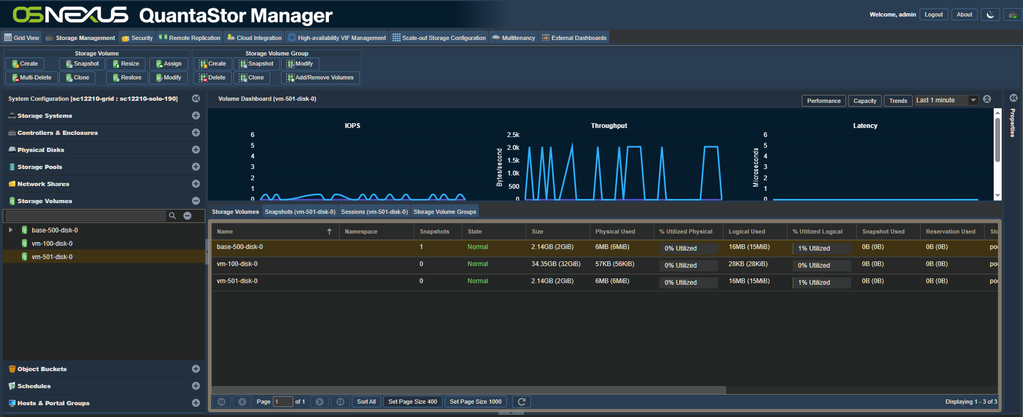
One of the practical advantages of the one-volume-per-disk design is that Proxmox workloads are first-class objects in QuantaStor Manager. Each VM disk and container rootfs appears as a named storage volume following the Proxmox naming convention (vm-100-disk-0, base-500-disk-0, and so on), with per-volume IOPS, throughput, and latency visible in the volume dashboard. Storage administrators can see exactly which VM or container is driving load, apply snapshot schedules and remote replication at per-workload granularity, and track thin-provisioned versus physically consumed capacity for each guest.

Getting Started
The plugin supports Proxmox VE 9.1 and 9.2 and installs as a Debian package on each cluster node, with the QuantaStor storage type appearing in the web UI immediately after installation. Packages, source, documentation, and a detailed troubleshooting guide are available on GitHub:
https://github.com/OSNEXUS/pve-quantastor-plugin
For customers evaluating Proxmox as part of a virtualization platform migration, QuantaStor provides a shared storage foundation with the enterprise data services those environments expect: snapshots, remote replication, encryption at rest, and high availability. Reach out to your OSNexus solution architect or contact us at osnexus.com to discuss reference configurations for Proxmox deployments.
Questions, comments, please write us at info@osnexus.com. To get started with QuantaStor (free Community Edition available) visit https://osnexus.com/downloads to get the QuantaStor OS ISO image and license keys for Community or Trial Edition.

I’m the CEO & co-founder of OS NEXUS, a storage appliance software company with a focus on scale-out storage management. We do a lot of hardware and software storage technology integration on Linux with our QuantaStor Software Defined Storage (SDS) platform this blog is our way to share some thoughts and insights on these technologies and where we’re headed with SDS.
About The Author

Leave a Reply