

Every object store eventually fills up with data and much of that is often “cold” data that nobody reads. Last quarter’s render outputs, closed-out project archives, video that has already aired, log bundles kept for compliance: in most buckets the bulk of the capacity is objects that were written once and have not been touched in months. That data still sits on the same drives, the same power budget, and the same expansion plan as the hot data, and the usual answers are both bad: buy another rack of disk, or ask every application team to move their own old objects somewhere cheaper and update every client that points at them.
QuantaStor 6.9 adds a third answer. A bucket lifecycle policy on the local scale-out object storage cluster (CephRGW based) can now move objects past a given age out to a bucket at AWS S3, or at any other S3-compatible provider, without the application changing anything. The object stays listed in the same bucket, under the same key; only its data moves.
How it works
Two new pieces work together. A cloud-tier storage class is a storage class on your QuantaStor object cluster whose data lives at a cloud provider instead of on a local pool. A lifecycle rule on a bucket says “move objects to that class once they are N days old”. The object gateway runs the rule in the background, copies each object to the cloud bucket, and keeps a head object locally so listings and HEAD requests still work.
Setup takes four steps: add cloud credentials, create the cloud-tier class, add the rule, and confirm it.
Step 1: Add your cloud credentials
Add the access key for the cloud account under Cloud Integration. The same credentials are shared with Cloud Containers, and any S3-compatible provider you add with Supports Ceph Cloud Tiering selected can be used as a tiering target.
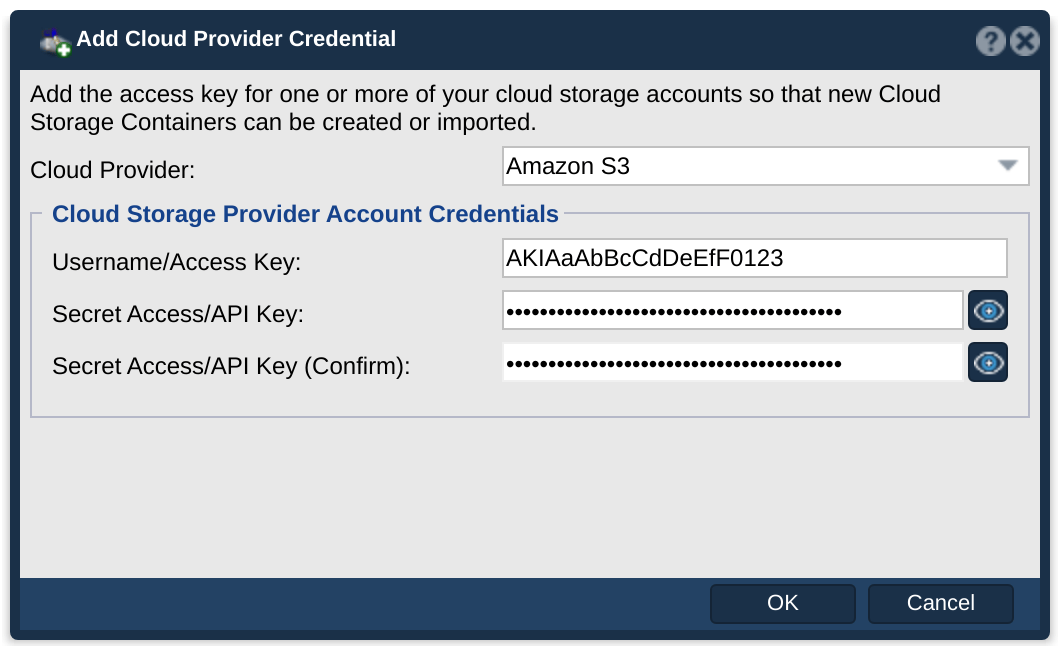
Step 2: Create a cloud-tier storage class
Under Scale-out Storage Configuration, create an object storage class and choose Destination Cloud. Pick the credentials, the region, and the provider storage class the tiered objects are written into; STANDARD_IA is a good fit for data that is rarely read but must stay online.
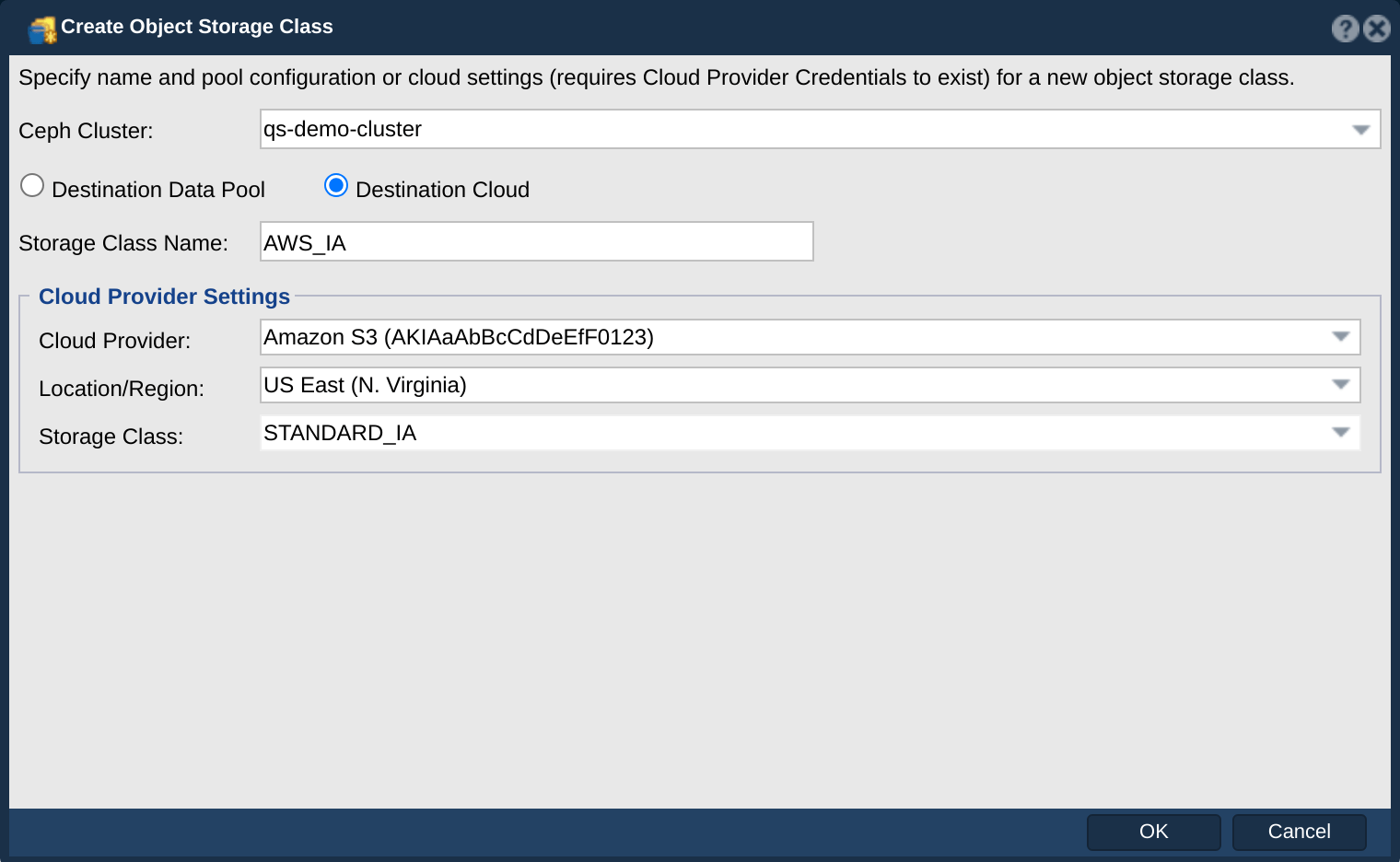
Archive classes such as S3 Glacier and Glacier Deep Archive need restore settings as well, and in 6.9 you create those from the qs CLI.
Step 3: Add a lifecycle rule to the bucket
Select the bucket and create a lifecycle rule. Choose Transition, set the number of days, and pick the class you just created. Leave the filter empty to tier the whole bucket, or use a prefix or a size range to tier only part of it — for example only objects under archive/ that are larger than a megabyte.
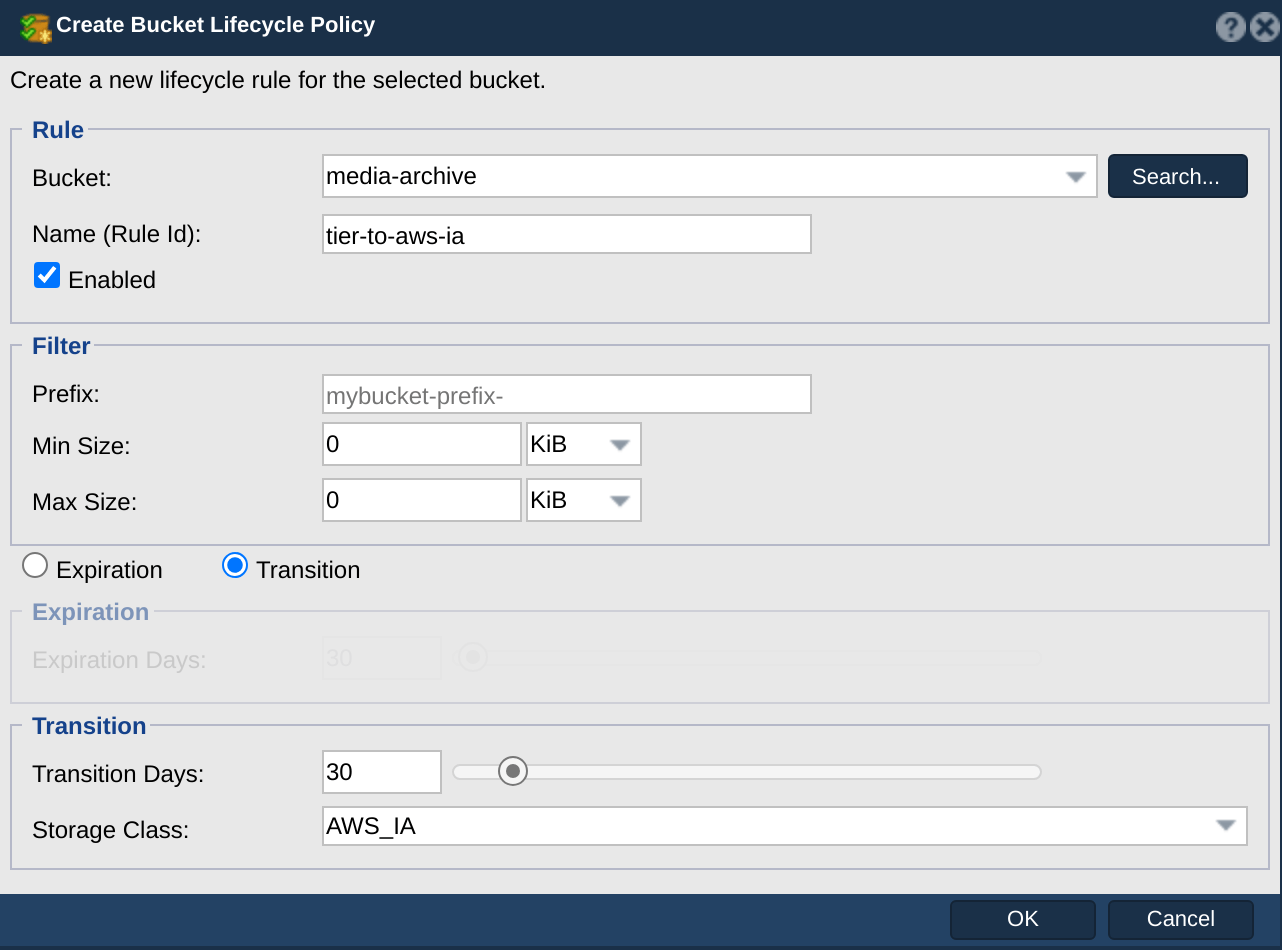
The same dialog also creates Expiration rules, and QuantaStor now manages both kinds for any bucket on the cluster, including rules that S3 clients set themselves.
Step 4: Confirm the rule
The View dialog lists every rule on the bucket, and an S3 client reading the bucket’s lifecycle configuration sees the same rule. Once an object passes the rule’s age, a HEAD request reports its new storage class, and its data is in the cloud bucket.

Objects written to a local QuantaStor bucket appeared in the AWS bucket after the lifecycle pass, and the local bucket kept listing them with the cloud storage class.
Tiering is not a backup
Tiering moves data; after the transition there is one copy, in the cloud. If you want a second copy in another place, that is what bucket sync policies and remote replication are for, and the two can be combined. For per-bucket control of who gets how much of the gateway, 6.9 also adds bucket rate limits, documented alongside tiering on the wiki.
Summary
QuantaStor 6.9 lets you keep hot object data on your own scale-out (Ceph based) object storage cluster and push cold data to AWS S3 or any S3-compatible provider automatically, with no client changes, using standard S3 lifecycle rules. The full procedure, every dialog field, and the CLI equivalents are in the Object Storage Classes and Cloud Tiering and Bucket Lifecycle Policy pages on the wiki.
Questions, comments, please write us at info@osnexus.com. To get started with QuantaStor (free Community Edition available) visit osnexus.com/downloads to get the QuantaStor OS ISO image and license keys for Community or Trial Edition.

I’m the CEO & co-founder of OS NEXUS, a storage appliance software company with a focus on scale-out storage management. We do a lot of hardware and software storage technology integration on Linux with our QuantaStor Software Defined Storage (SDS) platform this blog is our way to share some thoughts and insights on these technologies and where we’re headed with SDS.
About The Author

Leave a Reply